CRM for Indian SMB sales teams
Stop losing leads to missed follow-ups.
Winbonds CRM keeps every enquiry in one place, puts it with the right salesperson, and shows your team exactly who needs a call back today.
- Capture enquiries from website forms, WhatsApp and CSV imports in one place
- Assign every lead to the right salesperson — and see where it came from
- Spot overdue follow-ups before a customer goes cold
- Give managers a clear view of team activity and the pipeline
No payment details needed — just a walkthrough for your team.
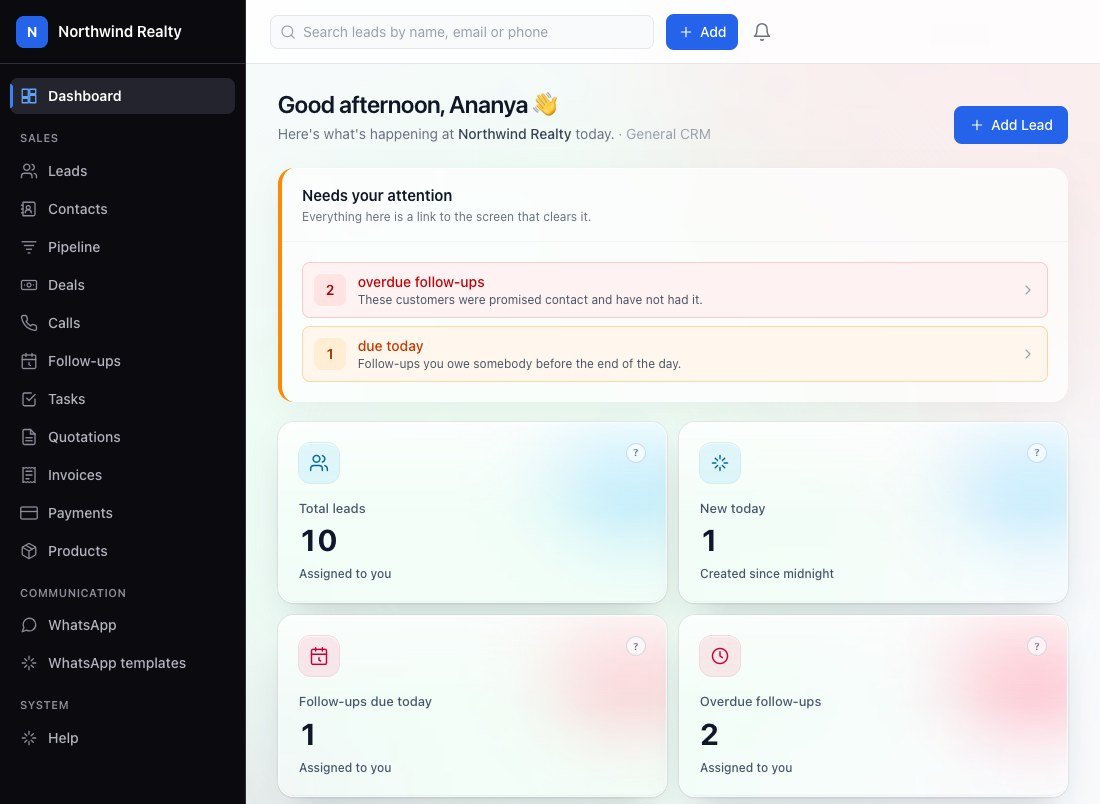
Built for enquiry-led businesses across India
- Education & Coaching
- Travel & Tourism
- Healthcare & Diagnostics
- Real Estate
- Services & B2B Sales
Key features
Everything your team needs to turn enquiries into sales
One place to capture every enquiry, hand it to the right person, and make sure somebody calls back — with the numbers to show it happened.
-
Lead capture from every source
Bring in leads from your website, WhatsApp, Meta Ads, Google Ads, IndiaMART and Justdial — one list, instead of enquiries scattered across inboxes and phones.
-
Know where every lead came from
Each lead carries its source — Meta Ads, Google Ads, IndiaMART, Justdial, website, WhatsApp, referral or walk-in — so you can see which channels bring real business.
-
The right lead to the right person
New leads without an owner are shared out in turn across your team. Managers reassign in one click, and every handover is recorded.
-
No follow-up forgotten
Every lead gets a dated next step. Overdue and due-today follow-ups sit at the top of each person's dashboard until they are done.
-
Calling that writes itself down
Tap to call, then log the outcome and notes. A "not answered" or "busy" books the next attempt for you.
-
WhatsApp on the lead record
Reply to customers from a shared inbox on your own WhatsApp Business account, with every conversation saved against the lead.
-
A pipeline in your own stages
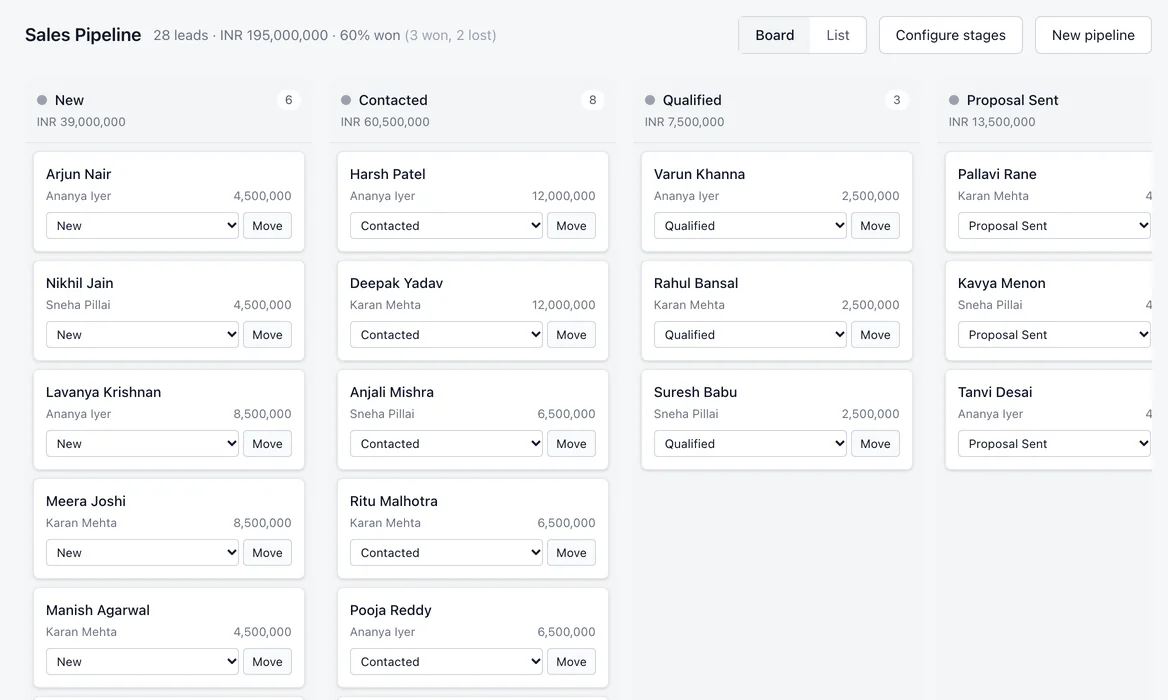
See every lead by stage on one board. Name the stages, set their order, and require a reason whenever a lead is lost.
-
Reports owners actually read
Leads, calls, follow-ups, deals, WhatsApp and team performance — filtered by date and exported to CSV, Excel or PDF.
Also in every workspace: your own custom fields on leads, contacts and deals · automation rules (when this happens, if that is true, do this) · deals · attendance and leave for field and calling teams.
Built for every business
One CRM, set up the way your industry sells
Your workspace comes with your industry's stages, its own words for leads and owners, and the fields your team needs to ask about.
-
Education & coaching
Give every student enquiry a counsellor, a counselling date and a clear route to admission.
Typical stages
New enquiry → Counselling → Course shortlisted → Fee pending → Admitted
Fields: Course of interest, intake or batch, parent contact
-
Travel & tourism
Capture destination, dates and budget on the first call, then follow each quote to a confirmed booking.
Typical stages
New enquiry → Requirement collected → Quote sent → Payment pending → Booking confirmed
Fields: Destination, travel dates, travellers, budget
-
Healthcare & diagnostics
Turn calls and WhatsApp enquiries into booked appointments and tests at the right branch.
Typical stages
Enquiry → Appointment booked → Visited → Report shared
Fields: Test or service, preferred branch, preferred slot
-
Real estate
Match buyers to projects, schedule site visits and track every enquiry towards a booking.
Typical stages
New enquiry → Site visit scheduled → Site visit done → Negotiation → Booked
Fields: Project, budget, location, configuration
Manage your team
Know who is following up — and who is not
Give every salesperson a clear list of what to do today, and give yourself a clear view of whether it got done.
-
Everyone sees exactly what their role needs Owners see the business, managers see their team, callers see their own leads — enforced by permissions, not by hiding a menu.
-
Work is shared out fairly New leads without an owner go to your team in turn. Reassign any lead in one click; every handover is kept on record.
-
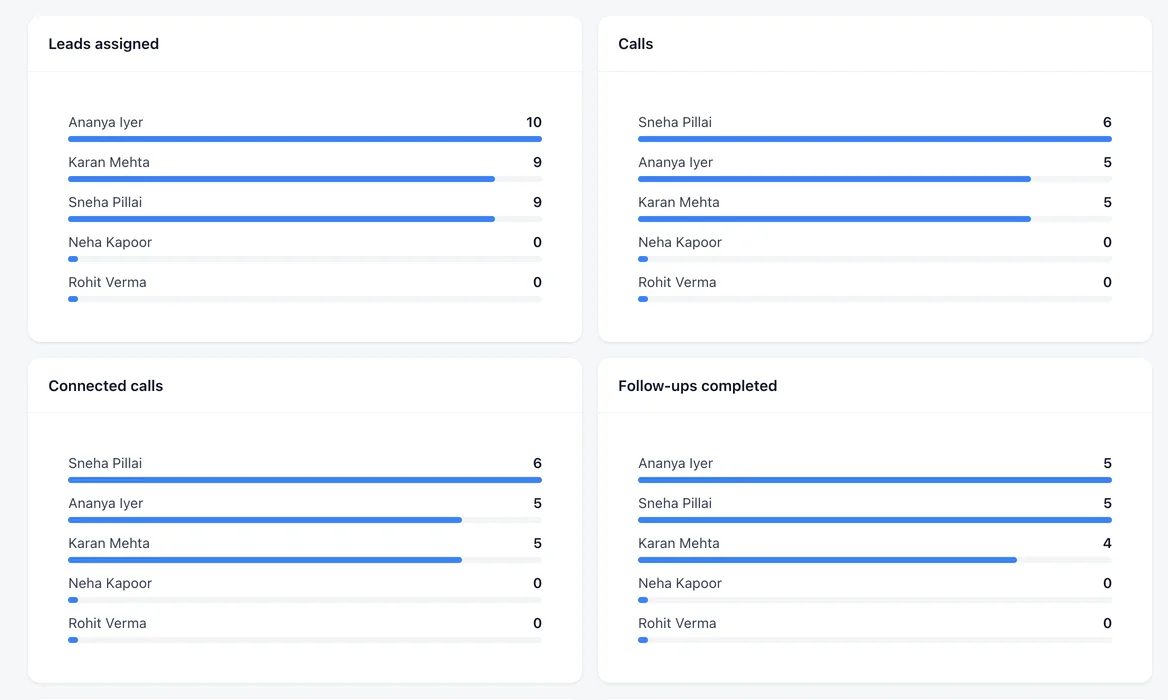
Activity per person, not guesswork Leads assigned, calls made, calls connected and follow-ups completed — for each salesperson, for any date range.
-
Attendance and leave in the same place Your team starts the day and takes breaks from the app; leave requests are approved by a manager on the web.
Capture leads from all channels
Bring your leads from everywhere into one place
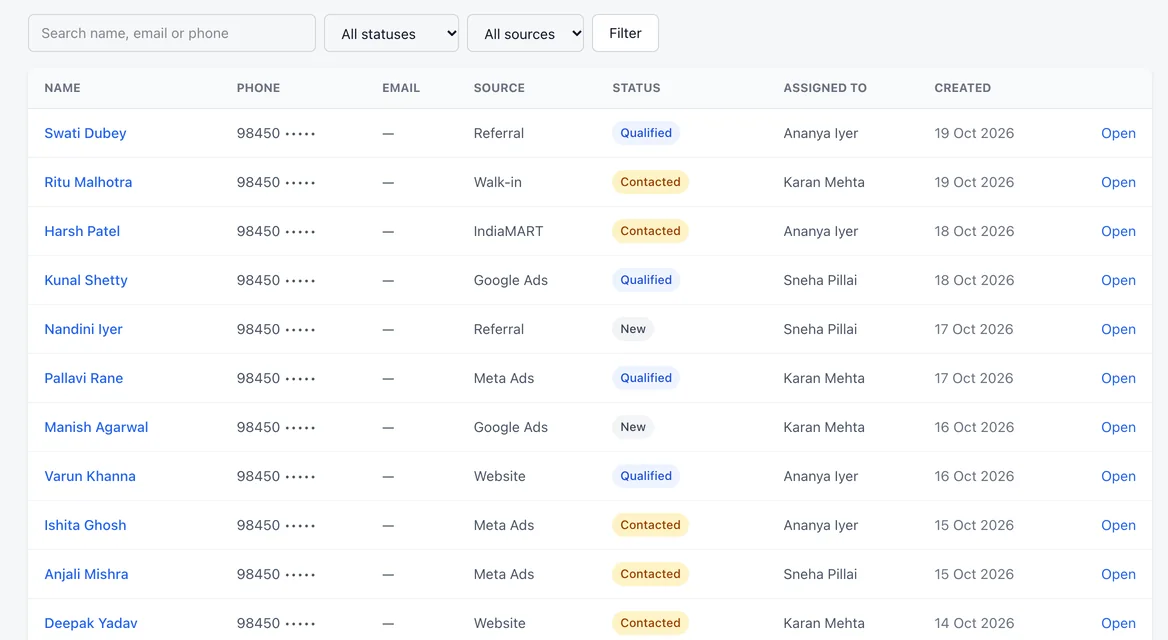
Bring in leads from Meta Ads, Google Ads, IndiaMART, Justdial, your website and WhatsApp — and know exactly where each one came from, so you keep funding the channels that bring customers.
- Website forms
- Meta Ads
- Google Ads
- IndiaMART
- Justdial
- Sulekha
- CSV import
- Referrals
-
How it arrives Straight from your website form or WhatsApp, as an import from your ad and marketplace accounts, or typed in by your team.
-
Where it came from The source recorded on the lead — filter the list by it, and see it counted in your reports.
-
Which campaign Campaign and ad details sit alongside the source whenever the channel passes them on.
How it works
Every lead, always with a clear next step
From the moment an enquiry arrives to the day it closes, your team knows what to do next — and you can see where every lead stands.
-
Step 1: A lead comes in
From your website form, WhatsApp, an import or a call — with its source recorded.
-
Step 2: It gets an owner
Shared out to your team in turn, or assigned by a manager. Nobody has to ask whose it is.
-
Step 3: Your team calls
Tap to call, then log what happened. A missed call books the next attempt by itself.
-
Step 4: The next step is dated
Every lead has a follow-up with a date and time, and overdue ones are impossible to miss.
-
Step 5: The deal moves forward
Move the lead through your stages, with a reason recorded whenever one is lost.
Caller app
One app for your calling team
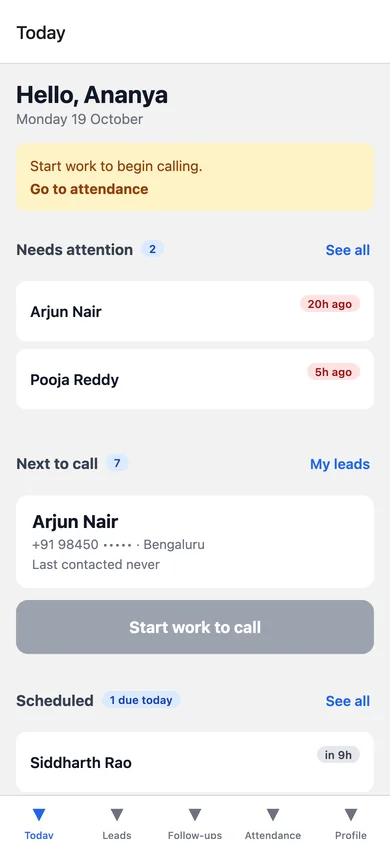
Calls, leads, WhatsApp, follow-ups and attendance in one Android app — and every call, outcome and working hour reaches your dashboard.
- Call in one tap Dial from the phone's own SIM, then log the outcome and notes the moment you hang up. A missed call books the next attempt.
- Leads and the next call Every lead assigned to you, and the next one to call, ready before you dial.
- WhatsApp from the lead Open the customer's chat in WhatsApp straight from their record.
- Follow-ups and reminders Overdue and due-today follow-ups flagged first thing, so nothing slips.
- Login and logout time Start the day, take breaks and finish from the app — times are recorded by the server, not the phone.
- Leave and new leads Apply for leave, and add a walk-in or site-visit enquiry in seconds.
Managers monitor performance
- Calls made and connected, per caller
- Follow-ups completed and overdue
- Start, break and finish times for every day
- Leads assigned to each person
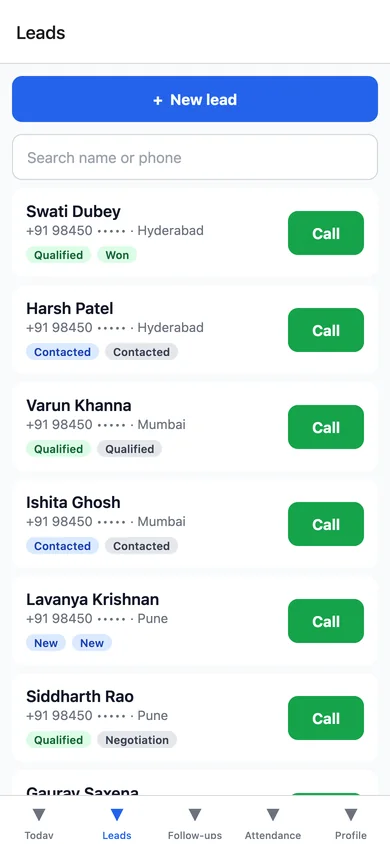
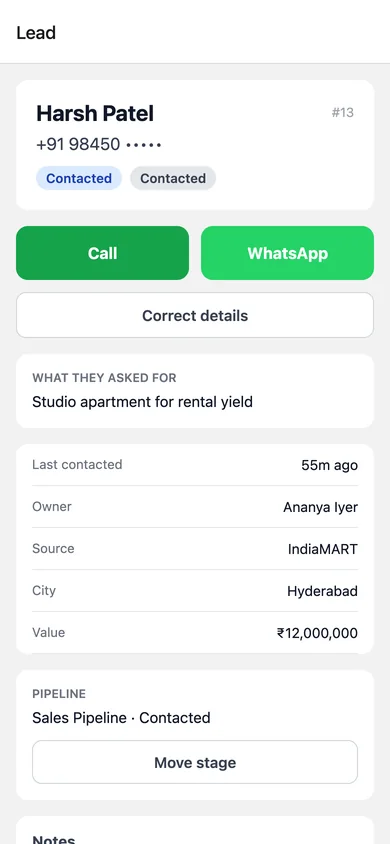
The Android app's own screens, shown with sample data.
Why Winbonds CRM
Built around the way Indian businesses sell
Calls and WhatsApp first, a team that is often on the move, and an owner who needs to trust the numbers. These are the decisions that follow from that.
-
Your WhatsApp, your account
WhatsApp runs on your own WhatsApp Business account. Meta bills you directly, and we add nothing on top of Meta's charges.
-
Your data stays yours
Every business works in its own workspace, kept separate from every other at four independent levels — from sign-in down to the database.
-
Figures you can trust
Calls logged by hand are marked as such, and a WhatsApp message counts as "delivered" only when WhatsApp confirms it.
-
Your words, your stages
Your workspace speaks your industry's language and follows your sales stages, rather than asking your team to learn ours.
FAQ
Questions businesses ask us
What is Winbonds CRM?
Winbonds CRM is a CRM for Indian small and medium businesses that sell through calls and WhatsApp. It keeps every enquiry in one place, gives each one an owner and a next step, and shows owners and managers what their team is doing — on the web and on an Android app.
Which types of businesses is it for?
Any business that handles enquiries and follows them up: education and coaching, travel and tourism, healthcare and diagnostics, real estate, and service businesses. Your workspace is set up with your industry's stages, fields and wording.
Can I bring in leads from different sources?
Yes. Leads from your website forms and WhatsApp arrive directly, and you can bring in leads from Meta Ads, Google Ads, IndiaMART, Justdial or any spreadsheet by importing them as a CSV. Your team can also add walk-ins and phone enquiries on the web or the app — all in one list, each with its source.
Can I see where each lead came from?
Yes. Every lead is recorded with its source — website, WhatsApp, Meta Ads, Google Ads, IndiaMART, referral, walk-in and others in your list. You can filter the lead list by source and see leads counted by source in your reports.
Can I assign leads to my sales team?
Yes. Leads that arrive without an owner are shared out to your team in turn, and a manager can assign or reassign any lead in one click. Every handover is kept on record.
Can managers keep track of follow-ups and activity?
Yes. Each person's dashboard shows what is due and overdue, managers can filter follow-ups by team member, and the team performance report shows leads assigned, calls made, calls connected and follow-ups completed per person.
Does it work with calling and WhatsApp?
Your team calls from their own phones and records the outcome on the lead; a missed call books the next attempt automatically. Phones do not reliably report when a call ends, so the caller confirms the outcome, and calls logged by hand are marked so your reports stay accurate. WhatsApp runs through your own WhatsApp Business account, with a shared inbox and approved templates.
Can it be set up for my industry?
Yes — that is how every workspace starts. Your pipeline stages, lead statuses, sources and wording are set up for your industry, and you can add your own fields to leads, contacts and deals.
Is there a mobile app?
Yes — one Android app for your calling team: assigned leads, one-tap calling with outcome logging, WhatsApp from the lead, follow-up reminders, new leads, and attendance with start, break and finish times. Managers see each caller's calls, follow-ups and working hours in the web reports. Ask about access for your team during your demo.
How do I get started?
Book a demo using the form below. We will walk through your sales process, then set up your workspace with your industry's stages and lead sources and create accounts for your team.
Book a demo
See Winbonds CRM with your own sales process
Tell us a little about your team. We will show you the parts that matter to your business — no payment details, no obligation.
-
We get in touch Usually by phone or email, to find a time that suits you.
-
We walk through your process Your lead sources, your stages, and how your team follows up today.
-
We set up your workspace With your industry's stages and sources, and accounts for your team.
Ready to get organised?
Bring your leads, your team and every follow-up together
See how Winbonds CRM fits the way your business sells — set up with your industry's stages and your own lead sources.
Already using Winbonds CRM? Sign in to your workspace